100% Safe
& Secure
1 Year
Free
Support
Money Back
Guarantee
Lifetime FREE
license
Best Key Features of MBOX to IMAP Migration Software
vMail MBOX to IMAP Conversion Software offers a wide range of advanced features included bulk email migration, date-based filtering, multiple export option, previewing data and more. Software let you add single and multiple MBOX files and completely migrate them to Gmail and other IMAP Supported servers. Explore all features advanced them according to your requirement.
Direct Migration from MBOX to IMAP
With downloading this vMail MBOX to IMAP Converter Software, you can easily extract data from MBOX Files and migrate it to IMAP Server without data loss. Software ensures complete data conversion and preserve folders structure during conversion time. Simply entire your login credentials and migrate your data securely.
Import Multiple MBOX Files at Once
This powerful vMail MBOX to IMAP Migration Software enables bulk migration of multiple MBOX files—which may include contacts, calendars, tasks, notes, emails, and more—into Gmail and other IMAP-based server accounts. All data is migrated securely while maintaining its original structure and properties.
Preview Emails and Attachments
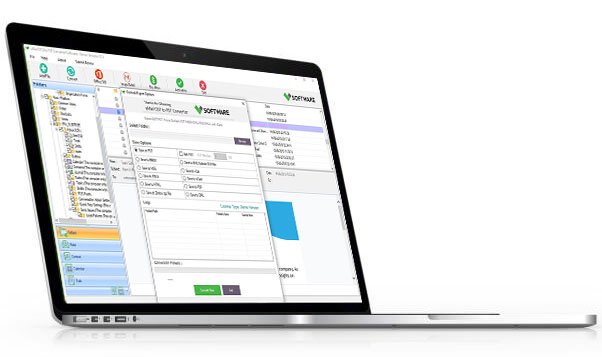
The vMail MBOX to IMAP Converter Software gives complete MBOX Folders preview such as- emails, contacts, calendars attachments before migration. Software let users to verify the data and ensures all is ready for accurate export to the IMAP Server.
Compatible with All G Suite Plans
vMail MBOX to IMAP Migration Software is completely compatible with all Google Workspace (G Suite) plans including Enterprise, Business, and Education. It supports MBOX files from major email applications such as Eudora, Apple Mail, Thunderbird, and others. Software supports IMAP servers like Zoho Mail, AOL, and Gmail on all Windows operating systems.
Preserves Complete Data Integrity
The vMail MBOX to IMAP Migration Software ensures 100% data safety during migration. Software maintains attachments, formatting, headers, email attributes, and all properties such as To, CC, BCC, subject, date, and time—ensuring nothing is changed or lost.
Date-Based Email Filtering
If you want to migrate only selected emails from a specific time period, the MBOX to IMAP Migration Software date-filtering option is extremely useful. Just choose the start and end dates, and the tool will help you export only those emails between the selected time range without any data loss.

How vMail MBOX to IMAP Works
A step-by-step guide to using vMail MBOX to IMAP or Gmail Migration to Import Single or Multiple MBOX Files into Gmail Account
DetailsSoftware Screenshots


System Requirements
- Processor Pentium Class
- Operating System Windows 11, 10, 8.1, 8, 7, Vista, XP
- Memory Minimum 128MB RAM (512MB recommended)
- Hard Disk 150 MB of free space for Software installation
What Our Client Say ?
Synergistically engineer functionalized applications rather than backend e-commerce.

“Very easy-to-use software with clear options. The preview feature aided me verify my emails before exporting them to IMAP.”
“Great vMail MBOX to IMAP Migration Software for professionals! It supports all IMAP servers and works perfectly with Google Workspace accounts.”
“I was worried about data loss, but this vMail MBOX to IMAP Migration Software preserved all my attachments and email properties. Excellent performance!”

FAQ's
Can I migrate multiple MBOX files at once?
Yes. The vMail MBOX to IMAP Migration Software supports bulk migration, letting you to transfer multiple MBOX files in a single process without losing the folder structure.
What IMAP servers are supported?
The tool supports all major IMAP servers such as iCloud, Yahoo, Outlook.com, Gmail, AOL, Zoho Mail, Office365 (IMAP), and many others.
Is there any file size limitation for MBOX migration?
No. The vMail MBOX to IMAP Migration Software supports large-sized MBOX files and can migrate them without affecting performance or data integrity.
Does this tool support Gmail and G Suite migration?
Yes. The software is fully compatible with Gmail and all Google Workspace (G Suite) plans, including Enterprise, Business, and Education accounts.
Does the software work on all versions of Windows?
Yes. The vMail MBOX to IMAP Converter tool is compatible with all Windows versions, including Windows 11, 10, 8, 7, and Windows Server editions.