100% Safe
& Secure
1 Year
Free
Support
Money Back
Guarantee
Lifetime FREE
license
Advanced Key Features of MSG to IMAP Migration Software
Download advanced technology-based vMail MSG to IMAP Migration software, recommended by IT experts to solve problem related to migrate MSG Files to IMAP Server. It is a tool which have multiple features and provides easy steps for MSG to IMAP Migration. Come and get aware from all the basic and advanced features of the software.
Migrate MSG Files to IMAP & Gmail Accounts
With download vMail MSG to IMAP Migration Software all users can easily recover all MSG File data included- emails, contacts, journals, notes and Migrate MSG Files to IMAP Server with hassle-free migration process —no technical expertise required.
Bulk MSG to IMAP/Gmail Migration
MSG to IMAP Migration tool is 100% powerful and specially designed to Import MSG File to IMAP Server. It supports bulk migration, easily handles large MSG File with preserve data to convert multiple MSG Files, folders and emails with their attachments into IMAP.
Export MSG Files to Multiple Platforms
You can Export MSG Files to Multiple format such as- Yahoo Mail and Zoho Mail. The vMail MSG to IMAP Converter Software preserve all database and convert the data of MSG File to IMAP and Gmail also without data loss.
Extract Complete Email Data
Easily extract the entire key email elements such as- including attachments, contacts numbers, emails address and many more from MSG Files. Software helps you Convert MSG Emails, journals, notes, calendars, notes to IMAP and Gmail/ G-suits with no corruption.
Perform Selective Migration
Migrate selective items from MSG File, you can choose date filtering option of the software where you can set the specific period time dates and convert all emails with preserve emails properties and attributes. Software Export selective MSG File data to IMAP and Gmail Server Accounts.
Compatible with All Google Workspace Plans
SysMails MSG to IMAP Migration Software supports migration to any Google Workspace (G Suite) plan—Basic, Business, Enterprise, or Education—ensuring a smooth and uninterrupted transfer of your data.

How vMail MSG to Gmail Migration Tool Works
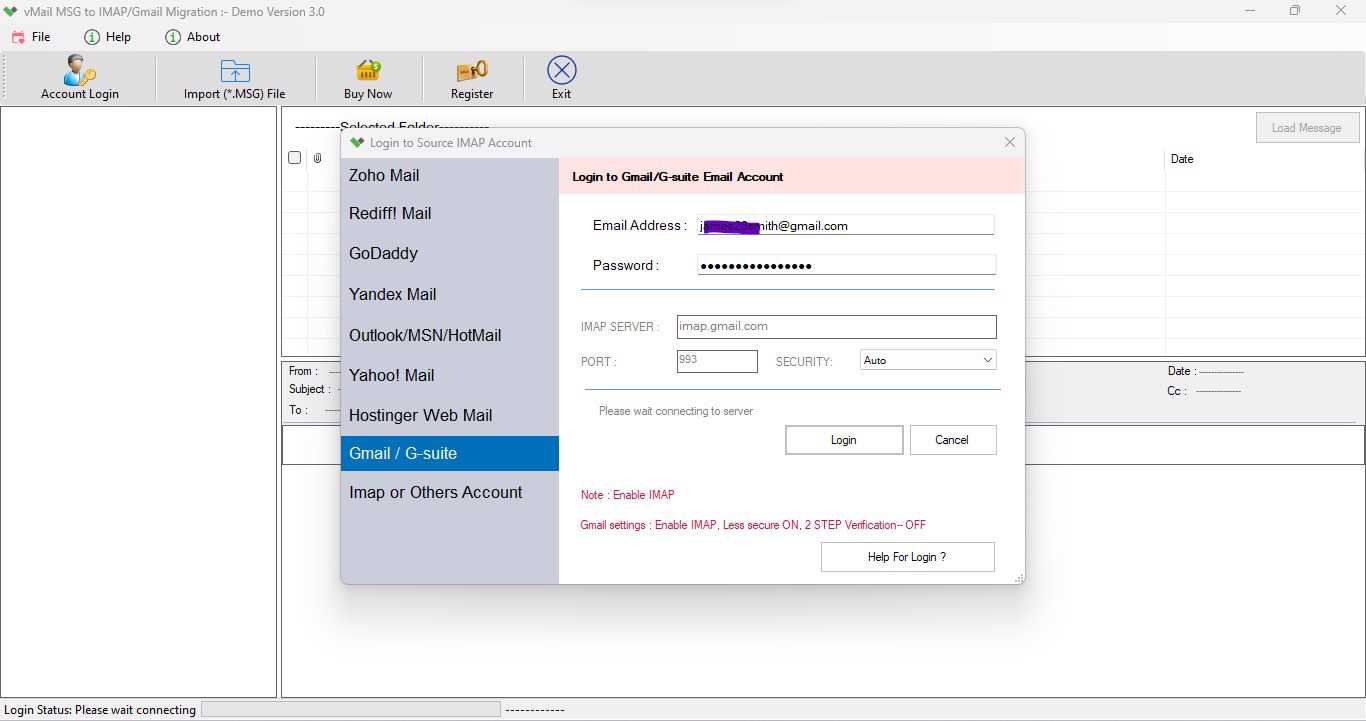
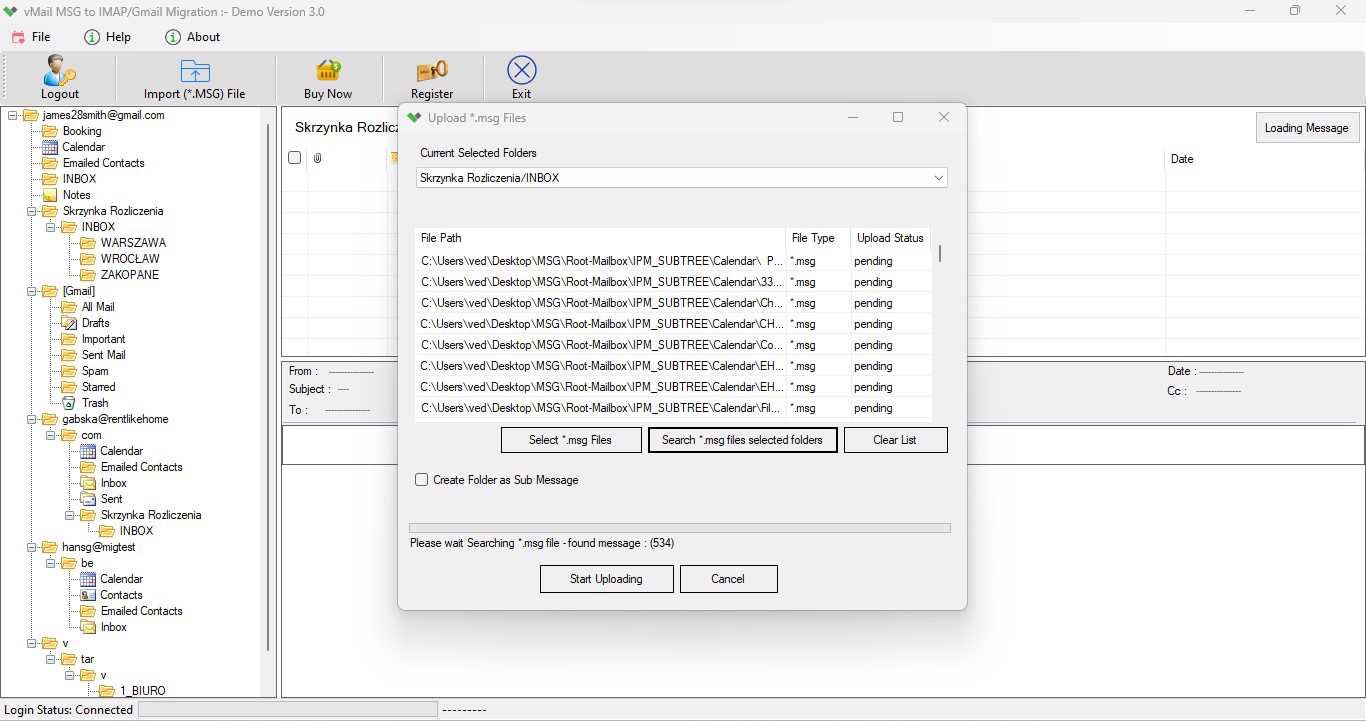
A step-by-step guide to using vMail MSG to Gmail Migration Tool to Import Multiple Outlook Messages(*.msg) file into Gmail Account
DetailsSoftware Screenshots

System Requirements
- Processor Pentium Class
- Operating System Windows 11, 10, 8.1, 8, 7, Vista, XP
- Memory Minimum 128MB RAM (512MB recommended)
- Hard Disk 150 MB of free space for Software installation
What Our Client Say ?
Synergistically engineer functionalized applications rather than backend e-commerce.

I’m impressed with the swiftness and accuracy of this tool. The selective conversion option saved me a lot of time by transferring only what I needed.”
The tool is tremendously user-friendly. I migrated my MSG files to Gmail in minutes without any technical help. Great experience!
I’ve tried other migration tools before, but vMail stands out for its stability and clean interface. Zero data loss, which is rare to find!

FAQ's
Can I migrate multiple MSG files at once?
Yes, with the software you can convert MSG File in bulk to IMAP and Gmail Accounts without loss data.
Do I need technical expertise to use this tool?
No, you don’t need to have technical experience because it has simple graphical interface that easily operate for MSG to IMAP Migration.
What IMAP servers are supported?
The vMail MSG to IMAP Migration Software all major IMAP-enabled servers, including Zoho Mail, Outlook.com, iCloud, Gmail, Yahoo Mail, and custom IMAP configurations from hosting providers.
Can this software handle large MSG files?
Yes, this MSG to IMAP Converter Software is capable to manage and migrate large MSG Files without performing issues or data losing.
Is there a free trial available?
Yes, the software comes with demo facility, you can try demo version of the software and save limited data but for complete data migration their need to purchase full version of the software.