100% Safe
& Secure
1 Year
Free
Support
Money Back
Guarantee
Lifetime FREE
license
Outstanding Key Features of Outlook Duplicate Remover Software
vMail Outlook Duplicate Remover Software helps you easily manage and clean your Outlook mailbox and remove duplicate emails from PST File. PST duplicate emails remover Software has several features to remove duplicate emails without problem. It helps you remove duplicate emails, contacts, calendars, and more from Outlook and improve the performance of your mailbox.
Remove Duplicate Emails in Outlook
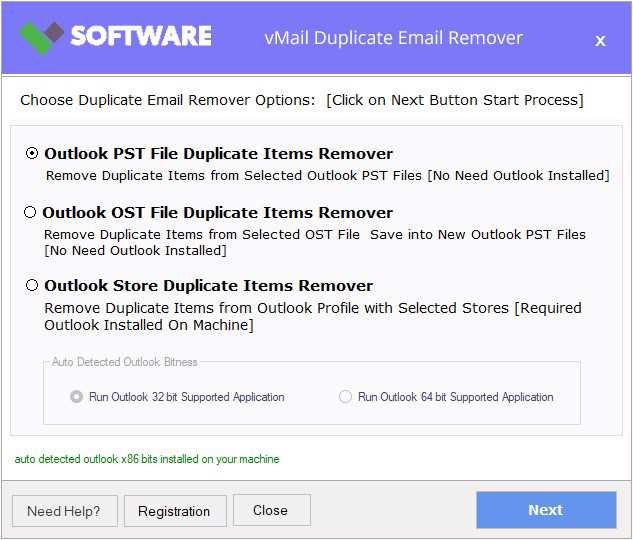
vMail Outlook Duplicate Email Remover is a progressive utility that scans your selected Outlook folders and proficiently removes duplicate emails based on user-defined criteria. Software remove duplicate items from PST data from PST mailboxes, outbox items, inbox items, delete folders and etc.
Remove Duplicates Across Multiple Outlook Folders
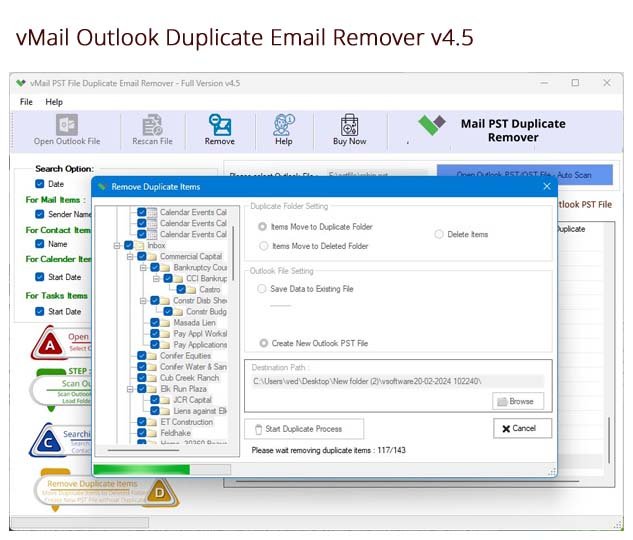
The Outlook Duplicate Items Remover tool allows you to select multiple folders simultaneously, allowing bulk duplicate email removal across various locations within your Outlook profile. This saves time in removing essential data without loss original database.
No Limit on PST File Size
Whether you're working with a small PST file or a large one spanning several gigabytes, the PST Duplicate Emails Remover software handles it smoothly by removing duplicate emails. There’s no restriction on file size, making it suitable for both personal and enterprise-level mailboxes.
Fully Compatible with Outlook & Windows Versions
vMail Outlook Duplicate Email Remover Software supports all major versions of Microsoft Outlook, including 2021, 2019, 2016, 2013, 2010, and earlier. It also works flawlessly across all popular Windows operating systems etc.
Preserves Original Folder Structure
During the removal process, the Duplicate Email Remover software maintains the original folder, sub-folders hierarchy of your Outlook PST file. Your mailbox remains neatly organized, with no changes to how your emails and items are categorized.
Advanced Filtering Options
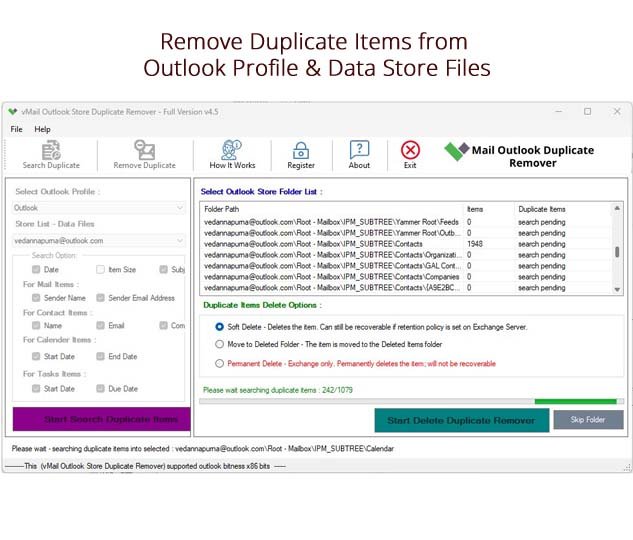
With smart Date Range and Task Filters, users can exactly target the removal process. With using this best Outlook Duplicate Email Remover Software, you can filter duplicates by a specific time frame or select specific Outlook items—such as emails, calendars, contacts, or tasks.

How to Work PST Repair Software
How to Works PST Repair Software which is converted multiple files format as Outlook PST Files ,MBOX File, Windows EML file & Outlook Message MSG Files.
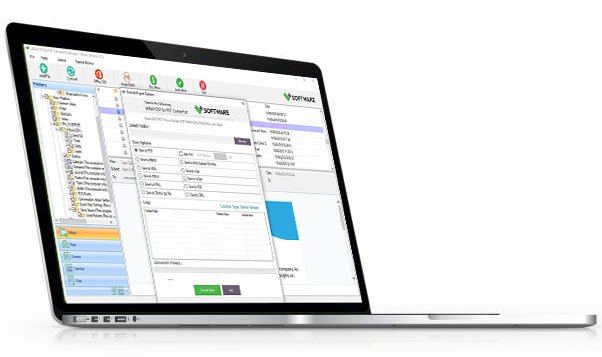
DetailsSoftware Screenshots
System Requirements
- Processor Pentium Class
- Operating System Windows 11, 10, 8.1, 8, 7, Vista, XP
- Memory Minimum 128MB RAM (512MB recommended)
- Hard Disk 50 MB of free space for Software installation
What Our Client Say ?
Synergistically engineer functionalized applications rather than backend e-commerce.

I use vMail Outlook Duplicate Remover tools frequently in client projects. It is one of the most reliable ones out there
I had thousands of duplicate emails cluttering my PST files. vMail Outlook Duplicate Remover Software cleaned everything up within minutes—super efficient and easy to use!
My Outlook was lagging due to too many emails. After using this duplicate email remover, the performance improved noticeably.

FAQ's
What types of Outlook items can this tool remove duplicates from?
This vMail Outlook duplicate remover Software can remove duplicates from emails, contacts, calendar entries, tasks, journals, and notes within your PST files.
Does the tool preserve the folder structure after removing duplicates?
Yes. vMail PST Duplicate Emails Remover Software ensures that your original folder hierarchy remains intact, preserving your mailbox organization.
Does it support Outlook versions other than the latest?
Yes. The Outlook Duplicate Items Remover tool is completely compatible with all Microsoft Outlook versions, including Outlook 2021, 2019, 2016, 2013, 2010, and earlier.
Can I filter duplicates by date or item type?
Absolutely. You can use advanced filters such as date range selection and specific item type filtering (e.g., emails only) for a more precise duplicate removal process.
Do I need to have Outlook installed to use this tool?
Yes. Microsoft Outlook must be installed and configured on your system for the tool to work properly.